Writing a Zig extension for Zephyr - Part I
Oct 06, 2025 - Last edited: Apr 23, 2026
Zephyr is an open-source RTOS, supporting several devices, across multiple architectures. It has a very active user base, and it is growing.
Zig is a new general-purpose programming language. It has many interesting features, like compile-time meta-programming, optionals and C integration.
I’ve been playing with Zig, and I’ve worked with Zephyr for a few years. What if I try to use Zig to create Zephyr applications? Is it doable?
David Brown presented (slides) about using Zig (and other non-C languages) at 2022 Zephyr Developer Summit. So, it’s doable. But I didn’t want to just repeat his experiment, so I turned my eyes to Zephyr extensions.
Zephyr Linkable Loadable Extensions
A few years ago, Zephyr gained support for Linkable Loadable Extensions(llext). With it, one can load ELF files into a Zephyr application, thus being able to... extend its features. And they need not to be built from the same tree as the Zephyr application. Zephyr allows one to export an EDK(Extension Development Kit) that can be used to create the extension without the application tree. This is important to allow an extension to be built by a different team from that the created the Zephyr application.
There’s potential here: if an extension is nothing more than an ELF file, and the EDK is all one needs to build an extension1, what if we create an ELF file using Zig and load it into a Zephyr application? Buckle up, let’s go down this rabbit hole!
Get Zephyr and Zig
Firstly, one needs to get both Zephyr and Zig. As a new language, Zig moves quite fast. This post is based on Zig 0.15.1, the most recent when it was being written. Check the release notes of future versions to check what changes are relevant for future... versions.
To get Zig, you can either download it or install from your favourite distro packages repository - if you use Linux, that is. I used it from my distro, it was easy as
# pacman -S zig
Check for your distro.
Zephyr is a bit more convoluted, though. I recommend simply following it’s getting started guide. It shall be easy enough, actually.
Finally, in this post I’ll use Renode. Renode is an open source simulator - and more, and I used it because Qemu was somewhat finicky. Again, you can get it from Renode or from your distro. There’s an AUR package for Arch Linux.
Now that you have everything in place, let’s head to the Zephyr directory to begin
The llext EDK sample
One of Zephyr samples is an EDK sample, which is at samples/subsys/llext/edk directory. Being an EDK sample, to run it, one is supposed to first generate the EDK, and then build the extensions before building the sample that will load the extensions to run. Easy, right?
First, from the virtual environment2, build the EDK from the sample:
(.venv) $ west build -p -b cortex_r8_virtual samples/subsys/llext/edk/app/
(.venv) $ west build -t llext-edk
First command will do an overall build of the application, but will not try to include the extensions yet (in fact, you’ll see a note like “Extension 1 not built, assuming EDK build.”). Second one will generate the EDK so that we can build the extensions.
The EDK file, llext-edk.tar.xz lives inside Zephyr build directory, at build/zephyr/llext-edk.tar.xz. Extract it to some location:
(.venv) $ tar xf build/zephyr/llext-edk.tar.xz
Here, I extracted it at Zephyr base directory. You shall see a new directory there, llext-edk. Now we’re ready to build the extensions. The EDK sample README states that the samples need two environment variables to be set in order to build:
LLEXT_EDK_INSTALL_DIR- where the extracted EDK is located;ZEPHYR_SDK_INSTALL_DIR- where Zephyr SDK is located.
So export them - I suggest using another terminal for building the extensions:
 $ export LLEXT_EDK_INSTALL_DIR=<zephyr-base>/llext-edk
 $ export ZEPHYR_SDK_INSTALL_DIR=<zephyr-sdk-dir>
To build the extensions - there are four of them - I suggest creating a simple bash script:
#!/bin/bash

for dir in ext1 ext2 ext3 k-ext1 ; do
    pushd $dir
    rm -rf build
    cmake -B build
    make -C build
    popd
done
Save it to the samples/subsys/llext/edk directory with some name - like, build.sh - and build the extensions (don’t forget to make it executable, chmod +x build.sh):
$ build.sh
If everything goes right, it should output that each extension was built without issues. Finally, back to the Zephyr virtual environment terminal, rebuild the application:
(.venv) $ west build -p -b cortex_r8_virtual samples/subsys/llext/edk/app/
And run it:
(.venv) $ west build -t run
You should see something like this on the terminal:
21:58:13.4732 [INFO] uart0: [host: 0.68s (+0.68s)|virt: 5.8ms (+5.8ms)] *** Booting Zephyr OS build v4.2.0-2921-gb2273bd24342 ***
21:58:13.4743 [INFO] uart0: [host: 0.68s (+1.23ms)|virt: 6.7ms (+0.9ms)] [app]Subscriber thread [0x14820] started.
21:58:13.4814 [INFO] uart0: [host:  0.68s (+7.1ms)|virt: 9.5ms (+2.8ms)] [app]Loading extension [kext1].
21:58:13.4929 [INFO] uart0: [host: 0.69s (+11.39ms)|virt: 40.6ms (+31.1ms)] [app]Thread 0x14400 created to run extension [kext1], at privileged mode.
21:58:13.4945 [INFO] uart0: [host:   0.7s (+0.87ms)|virt:  41.9ms (+0.9ms)] [k-ext1]Waiting sem
21:58:13.4960 [INFO] uart0: [host:   0.7s (+0.82ms)|virt:  43.2ms (+0.9ms)] [app]Thread [0x162a0] registered event [0x163d0]
21:58:13.4963 [INFO] uart0: [host:   0.7s (+0.27ms)|virt:  43.4ms (+0.2ms)] [k-ext1]Waiting event
21:58:13.4978 [INFO] uart0: [host:   0.7s (+1.32ms)|virt:  44.5ms (+0.9ms)] [app]Loading extension [ext1].
21:58:13.5055 [INFO] uart0: [host:  0.71s (+7.63ms)|virt: 62.8ms (+18.3ms)] [app]Thread 0x14718 created to run extension [ext1], at userspace.
21:58:13.5065 [INFO] uart0: [host:  0.71s (+0.85ms)|virt:    64ms (+1.1ms)] [app]Thread [0x14718] registered event [0x1c060]
21:58:13.5068 [INFO] uart0: [host:  0.71s (+0.26ms)|virt:  64.3ms (+0.3ms)] [ext1]Waiting event
21:58:13.5092 [INFO] uart0: [host:  0.71s (+1.85ms)|virt:  67.4ms (+2.6ms)] [app]Loading extension [ext2].
21:58:13.5144 [INFO] uart0: [host:  0.72s (+5.25ms)|virt: 80.8ms (+13.4ms)] [app]Thread 0x14610 created to run extension [ext2], at userspace.
21:58:13.5147 [INFO] uart0: [host:  0.72s (+0.31ms)|virt:  81.2ms (+0.4ms)] [ext2]Publishing tick
21:58:13.5162 [INFO] uart0: [host:  0.72s (+1.45ms)|virt:  82.3ms (+1.1ms)] [app][subscriber_thread]Got channel tick_chan
21:58:13.5169 [INFO] uart0: [host:   0.72s (+0.7ms)|virt:  83.1ms (+0.8ms)] [ext1]Got event, reading channel
21:58:13.5173 [INFO] uart0: [host:  0.72s (+0.46ms)|virt:  83.5ms (+0.4ms)] [ext1]Read val: 0
21:58:13.5183 [INFO] uart0: [host:  0.72s (+0.92ms)|virt:  83.9ms (+0.4ms)] [ext1]Waiting event
21:58:13.5192 [INFO] uart0: [host:  0.72s (+0.43ms)|virt:  84.9ms (+0.5ms)] [app]Loading extension [ext3].
21:58:13.5257 [INFO] uart0: [host:  0.73s (+6.52ms)|virt:  0.12s (+33.7ms)] [app]Thread 0x14508 created to run extension [ext3], at userspace.
21:58:13.5279 [INFO] uart0: [host:  0.73s (+0.82ms)|virt:   0.12s (+0.9ms)] [ext3]Waiting sem
21:58:13.5288 [INFO] uart0: [host:  0.73s (+0.94ms)|virt:   0.12s (+0.8ms)] [k-ext1]Got event, giving sem
21:58:13.5294 [INFO] uart0: [host:  0.73s (+0.54ms)|virt:   0.12s (+0.5ms)] [k-ext1]Got sem, reading channel
21:58:13.5297 [INFO] uart0: [host:  0.73s (+0.33ms)|virt:   0.12s (+0.3ms)] [k-ext1]Read val: 0
21:58:13.5299 [INFO] uart0: [host:  0.73s (+0.19ms)|virt:   0.12s (+0.2ms)] [k-ext1]Waiting sem
21:58:13.5302 [INFO] uart0: [host:  0.73s (+0.32ms)|virt:   0.12s (+0.3ms)] [k-ext1]Waiting event
21:58:13.5317 [INFO] uart0: [host:  0.73s (+0.75ms)|virt:   0.13s (+1.1ms)] [app]Thread [0x180b8] registered event [0x181e8]
21:58:13.5319 [INFO] uart0: [host:  0.73s (+0.27ms)|virt:   0.13s (+0.3ms)] [ext3]Waiting event
21:58:14.4006 [INFO] uart0: [host:    1.6s (+0.87s)|virt:   1.08s (+0.96s)] [ext2]Publishing tick
21:58:14.4013 [INFO] uart0: [host:   1.6s (+0.66ms)|virt:   1.09s (+0.9ms)] [app][subscriber_thread]Got channel tick_chan
21:58:14.4017 [INFO] uart0: [host:   1.6s (+0.47ms)|virt:   1.09s (+0.8ms)] [ext1]Got event, reading channel
21:58:14.4019 [INFO] uart0: [host:   1.6s (+0.24ms)|virt:   1.09s (+0.5ms)] [ext1]Read val: 1
21:58:14.4021 [INFO] uart0: [host:    1.6s (+0.2ms)|virt:   1.09s (+0.4ms)] [ext1]Waiting event
(...)
Wonderful! There’s no Zig yet, but at least we can see that the extensions do work. This sample is composed of an application, which exports a really simple pub/sub API, and four extensions that exchange messages among them. One of the extensions live in kernel space and the remaining ones in userspace, as shown in this image:
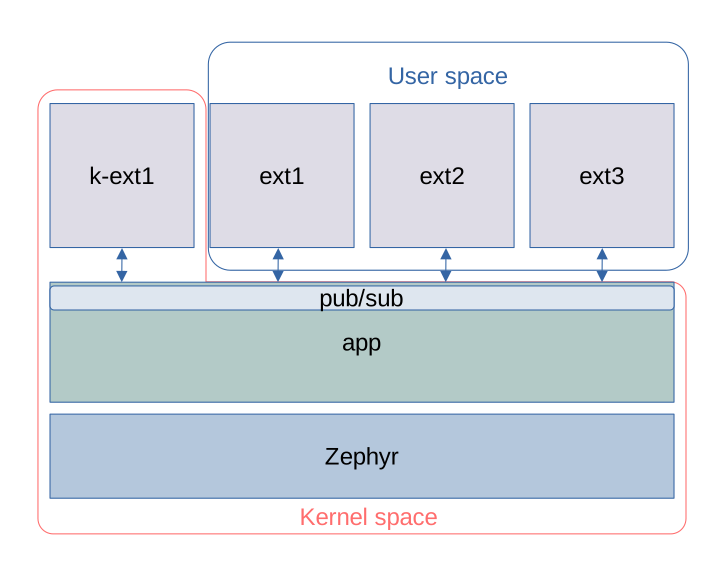
If you look closely at the output, you’ll see that extension ext2 published a periodic tick, which is then read by the other extensions. And some of you may be wondering how is the extension loaded - in this sample, they are loaded at build time (hence the need for a second build of the application). A bit contrived, one may think - but it’s just an example after all.
In the next installment we’ll see if we can replace one of the extensions with a Zig implementation!
tags: zig, zephyr, zig-zephyr-series